
Pricing grids and quota configurations are set up in Kronos (Managing pricing grids, Managing quotas). Once that configuration is ready, our team enables the Eventival custom form « Ticketack integration » on each screening (scheduling or film package) or event.
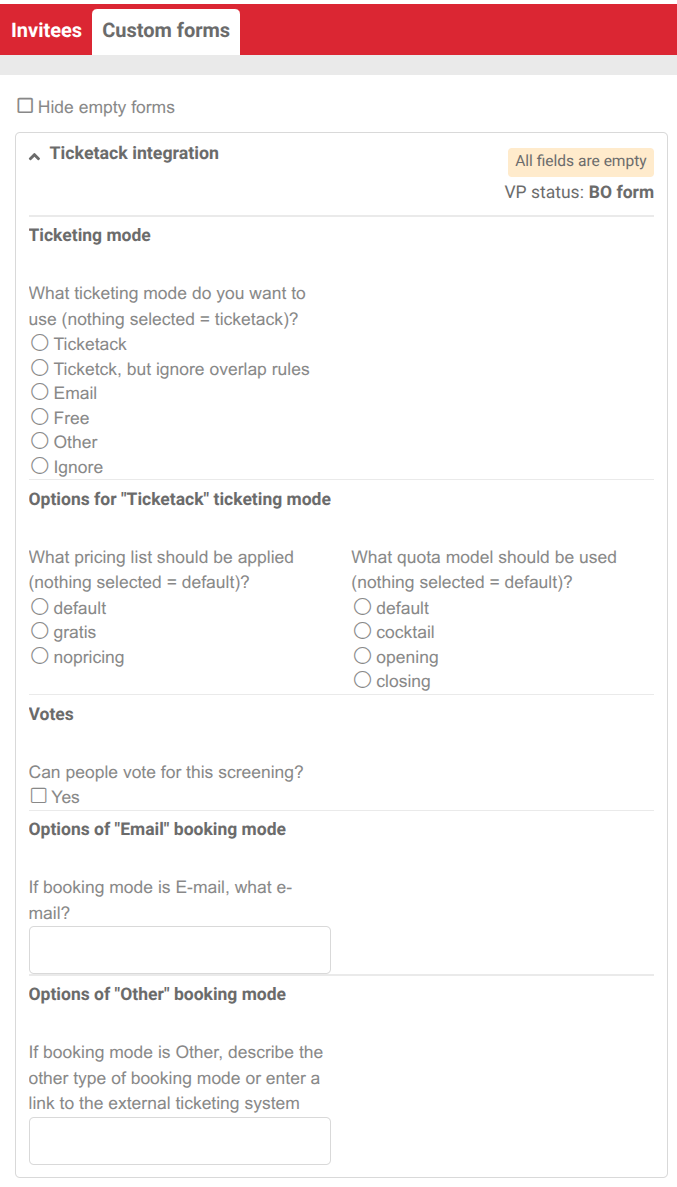
The custom form in Eventival
Open the Custom forms tab. The Ticketack integration section lists the fields used on import (see screenshot above).
Ticketing mode
What ticketing mode do you want to use (nothing selected = ticketack)?
- [nothing selected] / Ticketack — Standard ticketing; the pricing list and quota configuration below apply.
- Ticketack, but ignore overlap rules — Same as above, but overlap rules are ignored (e.g. a long cocktail slot spanning several screenings, or VOD screenings running through the whole festival).
- Free — Free admission without Ticketack ticketing. Note: for online booking at price 0, keep the default mode and pick a grid with only free prices (often gratis).
- E-mail — Manual bookings by e-mail. Grid and quotas are not applied.
- Other — External ticketing; describe it in the « Other » field. Grid and quotas are not applied.
- Ignore — Not imported into Ticketack.
Pricing list
What pricing list should be applied (nothing selected = default)?
Pick the Kronos grid id (e.g. default, gratis, nopricing). If nothing is selected, the default grid applies (except in Free, E-mail, Other or Ignore modes).
nopricing means no pricing grid is attached. See Managing pricing grids.
Quota configurations (Quota model)
What quota model should be used (nothing selected = default)?
Select the quota configuration from Kronos (e.g. default, cocktail, opening, closing). This replaces the old « Passes » checkboxes. See Managing quotas.
Votes
Can people vote for this screening? — Check Yes to allow audience voting.
E-mail and Other mode fields
- If booking mode is E-mail, what e-mail? — Contact address for reservations.
- If booking mode is Other, describe… — Free text or link to the external system.
See also: Basic setup with Eventival · Managing events with Eventival · Managing films and screenings with Eventival · Synchronising Eventival data


