

ProCinema (the Swiss association of cinema exhibitors and film distributors) issues cinema vouchers, including digital vouchers accepted in participating venues. These vouchers entitle the holder to a ticket for a regular screening; special formats, premium seats and extras (3D glasses, catering, etc.) are generally not covered by the voucher.
Ticketack integration
Ticketack can validate and redeem digital ProCinema vouchers at the time of sale, both at the box office and online. The spectator (or cashier) enters or scans the voucher code; Ticketack checks it with ProCinema, issues the ticket, then redeems the voucher. If the ticket is cancelled or refunded, the redemption is reversed on the ProCinema side so the voucher can be used again.
This integration covers digital voucher codes (ProCinema API). It does not replace the manual handling of paper stub vouchers, unless your venue uses the same digital code.
Configuration in Kronos
Credentials (API key and site ID) are provided by ProCinema. Once you have them:
- Open Settings → Integrations.
- In the catalogue, under Marketing and analytics, activate ProCinema.
- Fill in:
- API key — the key supplied by ProCinema;
- Cinema site ID (External ID) — your cinema’s external ID at ProCinema;
- Environment — Sandbox for testing, Production for live use.
- Save.
Both the API key and the cinema site ID are required. Without both, ProCinema pricing cannot be sold (a message indicates that the integration is not configured).
Switch to Production only after ProCinema has validated your access: a sandbox environment with a production key (or the reverse) is rejected.
Pricing configuration
You need a dedicated pricing in the pricing list for the relevant screenings (often named “ProCinema” or “ProCinema voucher”).
Basic information (price and value)
The amount redeemed with ProCinema is not the price charged at the till, but the pricing value.
Typical setup:
- Price: 0 — the spectator already paid for the voucher at ProCinema; Ticketack collects nothing.
- Value identical to price: disabled — otherwise the value would stay at 0 and redemption would be refused.
- Value: ticket amount to report to ProCinema (e.g. the matching full price), between 0.01 and 100 CHF.
If you charge a supplement (premium seat, 3D, etc.), keep it on a separate pricing: the ProCinema voucher normally covers only a regular screening.
Rules tab
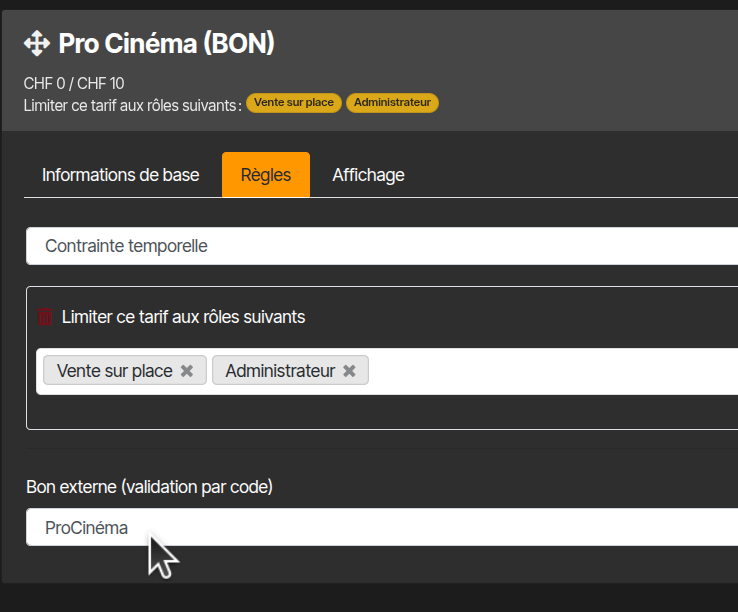
In the pricing Rules tab, set External voucher (code validation) to ProCinema.
Without this setting, no code is requested at sale and the voucher is neither checked nor redeemed.
You can also limit the pricing to certain sales points (box office only, or box office + online shop) using the usual constraints on the Rules tab.
Applying to screenings
As with any pricing: it must appear in the pricing list applied to the screenings (or ticket types) where vouchers are accepted.
Usage
- One code per ticket. Two seats require two distinct codes.
- At sale, a ProCinema voucher code field appears. You can type the code or scan it (barcode / QR reader): the reader fills the field automatically. The code is checked immediately; it is only redeemed when the ticket is issued.
- A code that is already used or expired is rejected with a clear message.
- A ticket refund reverses the redemption at ProCinema.


